iPad

RECENT POSTS

Paint or Paint App? Value of Creating Digital Vs. Traditional Art

8414244830_430e903163_z

Flickr: Naomi Chung

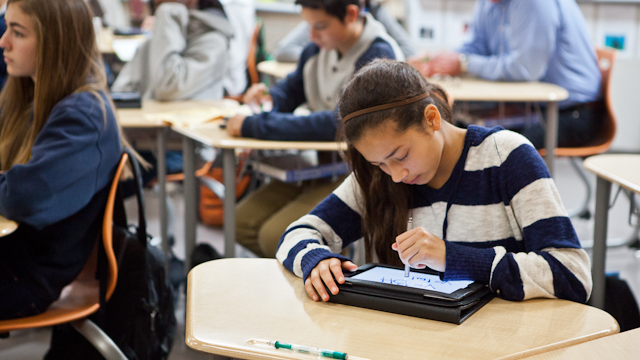
While it may be easy to imagine how iPads can support classroom studies with reading, history, or science, some of the most groundbreaking — and creative — work with digital tools may be happening in arts classes. Schools using iPads are incorporating them in art and music classes, too — and not only as tools for measuring and remembering, but for creating as well. Whether or not students grow up to become the next David Hockney – who has created several New Yorker covers using the iPad’s drawing tool – teachers say there is value to learning to create using digital tools, especially when blended with more hands-on means of expression.

Susan Sonnemaker, a middle school chorus and band teacher at San Francisco Day School, uses school-provided tablets in limited amounts throughout the year. She finds them most useful for managing technical aspects of music class with record speed — like recording practice sessions, using a tuner app to help kids tune their own instruments, and collecting digital practice sheets. For practical matters, Sonnemaker says, the iPad has been invaluable, because streamlining and managing tuning and practice leaves more time for actually playing or singing music.

“You can create something digitally that would be impossible to create by hand. Conversely, you can create something by hand that you cannot replicate digitally.”

But what about using tablets for inspiration and creating new music? When it comes to creating something new, Sonnemaker says that technology helps her students be more creative, not less: “In regards to composition, students are not only more engaged in their own projects (with iPads), but they’re using real life technology,” she said. “We still do a good deal of composition exercises using old-fashioned pencil and paper. But using Garageband on the iPad is what many professional musicians use, so students are also acquiring skills to compose in the real world if Continue reading

The Future of Tablets in Education: Potential Vs. Reality of Consuming Media

6660027849_17523f1d90_z

Flickr: Flickingerbrad

By Justin Reich

The Someday/Monday dichotomy captures one of the core challenges in teacher professional development around education technology. On the one hand, deep integration of new learning technologies into classrooms requires substantially rethinking pedagogy, curriculum, assessment, and teacher practice (someday). For technology to make a real difference in student learning, it can’t just be an add-on. On the other hand, teachers need to start somewhere (Monday), and one of the easiest ways for teachers to get experience with emerging tools is to play and experiment in lightweight ways: to use technology as an add-on. Teachers need to imagine a new future—to build towards Someday—and teachers also need new activities and strategies to try out on Monday. Both pathways are important to teacher growth and meaningful, sustained changes in teaching and learning.

In this four-part series, we’ll use the Someday/Monday template to explore four dimensions of using tablets, such as the iPad, in educational settings, examining how teachers can take students on a journey from consumption of media to curation, creation, and connection. Here, we’ll start with consumption.

Part I: Consumption

In the apocryphal photo of the iPad, the tablet rests in the lap of Steve Jobs, sitting on the stage at the iPad release demonstration, reclined in a leather chair. This was a device made for reading and watching, for sitting back, for passively consuming media. One of the signature challenges of the surge of interest in iPads is helping educators imagine the device as more than a library of books Continue reading

2012 Ed Tech Trends: Insights From Insiders

At the end of the year, pundits love to share their versions of summarized lists of what was hot in ed tech in 2012. In addition to the obvious — Common Core curriculum and assessments, games in learning, consumer tech in education — there are others that may be more subtle or even counter-intuitive.

Here are five, drawn from first-hand observation at major 2012 industry conferences ranging from the more traditional Association of Educational Publishers’ and Association of American Publishers’ Content in Context to the edgy SXSWedu event in Austin. These represent one perspective of what the education industry itself is seeing, cutting across individual conferences and events.


Flickr:remiforall

1. PAPER IS NOT DEAD

While digital is firing up imaginations and well-equipped classrooms, paper is still the pervasive medium of choice. Digital instruction is simply finally achieving equal billing for serious consideration and state and federal funding. Despite this year’s declaration from the FCC and U.S. Department of Education that the industry should replace paper with digital textbooks by 2017, financial and technical hurdles remain.

For example, one high-profile Open Educational Resources pilot in Utah uses digital resources to create paper high school science textbooks — at an attractive per-copy price of about five dollars, versus $80 for commercial texts. Why paper? David Wiley of Brigham Young University explained at SXSWedu that the digital device cost per student was high and much of the benefit could be derived in how the material was customized, taking advantage of paper’s “unlimited battery life.”

Technical concerns were front-and-center at a Consortium for School Networking/SIIA Feedback Forum held with district and state officials during the ISTE 2012 conference. While WiFi and devices may exist in a school district, distribution can be lumpy, creating hurdles to smooth implementation. “We have schools that are one hundred percent textbook, and schools that are fully digital — a broad spectrum,” said a Louisiana-based tech coordinator.

It is, one administrator from a California district noted, the last mile Internet connection into schools and even individual classrooms “where things get interesting.” Which renders paper Continue reading

SmartBoard, Make Way for Educreations

Julia Hum/Educreations

One of the biggest, fastest shifts in ed tech the last couple years has been the evolution from the use of large interactive whiteboards to the use of mobile, agile multi-purpose apps. Currently, there are at least six products, all competing to become teachers’ favorite. Replay Note, ScreenChomp, ShowMe, DoodleCast Pro, Knowmia, Explain Everything and Educreations all offer teachers the ability to record the visual and audio components of a “whiteboard” lesson on their iPads, and share it online.

Educreations is one of the top contenders, teachers say, mostly because of its simple user interface and multi-functionality. “I use it when I need to make quick videos in class,” said Ramsey Musallam, a high school chemistry teacher in San Francisco. Other features that teachers seem to love: the app offers more than one page for recording; the user can import images from other places and format them easily within the video; there’s a text feature so students don’t have to contend with messy teacher handwriting, and perhaps best of all, it can be used on desktop computers, not just an iPad.

“One of the problems with written textbooks is that kids get all the info right up front and that’s not how the problem solving process works”

One of the values educators look for in tech tools is student usability, and with Educreations, teachers say the tool is straightforward enough to incorporate into student work. Musallam says he always starts his class with a challenge question, which he solves in an Educreations video that he uploads to his website. There he keeps an archive of challenge problems that kids can look back Continue reading

10 Important Questions To Ask Before Using iPads in Class

Lenny Gonzales

By Terry Heick

When it comes to deciding how or whether to use iPads, schools typically focus on budget issues, apps, networking logistics, check-in and check-out procedures, school and district tech-use policies, hardware precautions, and aspects of classroom management.

But it’s also important to think about instructional use, and to that end, consider the following questions.

1.   What are the goals for iPad implementation? Engagement, access to digital textbooks, access to digital environments, primarily media consumption, media production, or a blend of everything?

2.   What can the iPad do that is not possible–or is clunky and cumbersome–without it? That is, what learning problems does the iPad solve?

3.   What sort of instructional planning are you using–traditional units, project-based learning, game-based learning, or something else? That is, what style of learning are you expecting the iPad to actuate?

4.   How should your instructional design and lesson planning be revised as a result of the iPad? What “fail-safes” should be built into activities to ensure learning is possible when the technology misbehaves and doesn’t do what you ask?

5.   What is your own comfort level with technology? What digital, physical, and human resources are available when something is needed?

6.   Will the iPad’s use always require special, specific planning? What changes could you Continue reading

Survey: Parents Prefer Reading Print Books to Young Kids

Don’t count print books obsolete just yet — especially when it comes to younger kids. A study released today by the Joan Ganz Cooney Center shows that even among parents who like reading e-books with their kids, the majority still prefer to read print books over e-books with their children.

The survey, which included 1,200 parents of children age 2 to 6, showed that, of those who owned iPads (462 in total), an overwhelming majority — 89.9 percent — said they read mostly print books and some e-books, compared to 7.5 percent who say they read print books and e-books equally with their children, and only 2.7 percent who read mostly or exclusively e-books.

But the report also draws an interesting conclusion about how print books or e-books (in this case, iPads with multimedia features) are alternately preferred in certain situations. During times when parents want to read with their kids (co-read, as the report calls it), print books are preferred, even when e-books are available. But parents prefer e-books when they’re traveling or commuting.

Mixed reactions were reported in other aspects too. Although parents recognize that e-books can play a role in developing their kids’ literacy skills, especially when kids are reading alone, many iPad owners — a full one-third surveyed — said that sometimes “it’s just too difficult to read with a child on digital devices, and nearly as many are worried the child would start to want to use the iPad all the time.” Overall, in fact, 60 percent of parents said they prefer their child to read traditional print books.

This report follows another, much smaller survey of 32 parents, which examined the difference Continue reading